ChatGPT now shows ads. If you run performance marketing, that single fact changes where your next test budget should go. OpenAI opened its self-serve Ads Manager to every advertiser in the United States in May 2026, and the platform has kept expanding since — new bidding options, new countries, and a growing list of brands (Best Buy, Lowe’s, and VistaPrint among them) already running live campaigns.
This guide walks through what ChatGPT Ads actually are, how the ad platform is structured, what it costs, and how to set up and optimize your first campaign — plus where this channel fits next to the marketing you’re already running.
What Are ChatGPT Ads?
ChatGPT Ads are sponsored units that appear below ChatGPT’s answer, clearly labeled “Sponsored,” typically alongside a small advertiser favicon. They’re not woven into the AI’s response and don’t change what the model tells someone — OpenAI has been explicit that ad content runs on separate infrastructure from the model itself, and the placement is architecturally kept apart from the answer generation.
Each ad unit includes a headline, short description, an image, the advertiser name, and a link to a landing page. Only one ad shows at a time per response, which keeps the experience relatively uncluttered compared to feed-based ad formats.
How ChatGPT Ads Actually Work
The single biggest mental shift for anyone coming from Google or Meta: there are no keywords and no demographic targeting. ChatGPT doesn’t run a real-time keyword auction the way Search does. Instead, it reads the context of the conversation and matches an ad based on relevance to what the person is actually asking about or trying to do.
The primary lever advertisers have over targeting is something OpenAI calls context hints — short, natural-language descriptions of the conversations, situations, or needs where your product might be relevant. These aren’t exact-match keywords; they’re closer to a set of scenarios you’re telling the matching system to watch for. Beyond context hints, the other targeting inputs are country, the wording of your ad itself, and how well your landing page matches the intent behind the click.
Who Actually Sees These Ads
Ads only show to logged-in adult users on ChatGPT’s Free and Go plans. Plus, Pro, Business, Enterprise, and Edu users don’t see ads at all, and OpenAI has said it won’t serve ads to accounts it predicts belong to someone under 18. Geographically, the rollout started in the US and has since expanded to several more countries, including Canada, Australia, New Zealand, the UK, and Japan.
Worth noting for anyone weighing this against a broader inbound marketing strategy: because ad matching happens entirely inside OpenAI’s own infrastructure and no personal chat data is shared with advertisers, this channel behaves more like a first-party, privacy-preserving version of intent-based advertising than the cross-web tracking most performance marketers are used to.
Campaign Structure: Campaign, Ad Group, Ad
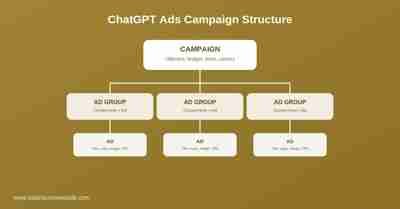
ChatGPT Ads follows a three-level hierarchy that will feel familiar if you’ve built campaigns on any major ad platform before:
- Campaign — sets your objective, your budget (daily or total), your date range, and which countries the campaign runs in. You can’t change the budget type after launch, though you can still adjust the amount.
- Ad Group — organizes ads around a theme or intent. This is the level where you set your context hints and your maximum bid.
- Ad — the actual creative: a title, description copy, an image, and the destination URL.
How to Set Up Your First ChatGPT Ads Campaign
- Create an account at ads.openai.com. You’ll need a business email, company details, a tax ID or EIN, a billing method, and a landing page for whatever you’re promoting.
- Choose your campaign objective. “Reach” optimizes for impressions and bills on a CPM basis; “Clicks” optimizes for clicks and bills on CPC. If you’ve set up conversion tracking, you can also optimize toward conversions while still paying per click.
- Set your budget and country targeting at the campaign level. There’s no minimum spend requirement as of this writing, so it’s realistic to start with a modest daily test budget.
- Build your ad group and write context hints. Describe the real questions, needs, or situations where your product fits — not a keyword list. Set your max bid here too: OpenAI’s starting guidance is roughly $3–$5 for CPC and a $60 ceiling for CPM (real-world CPMs have often landed closer to $15–$25).
- Write and submit your ad. Add a clear title, description, image, and a destination URL — append UTM parameters manually, since OpenAI’s platform doesn’t generate them automatically.
- Set up conversion tracking using OpenAI’s Conversions API or pixel before you scale spend, so you’re not flying blind on what’s actually converting past the click.
- Submit for review and monitor delivery. After approval, check your Ads Manager dashboard — if a campaign shows “Not serving,” hovering over the status will usually tell you why (often a policy or billing issue you can fix and resubmit).
ChatGPT Ads Pricing: CPC vs. CPM
The auction is relevance-weighted, not a pure highest-bid-wins system — a well-targeted ad with strong context hints can outperform a higher bid from a less relevant competitor.
- CPC (Clicks objective): you pay per click. OpenAI’s starting recommendation is a $3–$5 max bid, adjustable as you gather data. This is the better fit when you have a clear conversion event you’re optimizing toward.
- CPM (Reach objective): you pay per thousand impressions, with a $60 default max bid, though observed market CPMs have often run closer to $15–$25 for well-scoped audiences. This suits brand-awareness plays more than direct-response ones.
A practical way to test the water: run a small daily budget — many advertisers start in the $50–$100/day range — for a couple of weeks, watch cost-per-click and cost-per-conversion, and scale only what’s actually working.
Writing Context Hints and Ad Creative That Convert
Because there’s no keyword targeting to fall back on, the quality of your context hints and your creative does most of the targeting work. A few practical guidelines:
- Describe situations, not products. Instead of listing your product category, describe the questions or problems someone might be asking ChatGPT about right before your ad would be relevant.
- Match your landing page to the intent. Relevance scoring appears to factor in more than just the ad text — a landing page that doesn’t follow through on what the ad promised will likely hurt delivery over time, similar to Google’s Quality Score logic.
- Keep creative specific and offer-led. Generic brand messaging tends to underperform here; this channel rewards a concrete, intent-matched offer over broad awareness copy.
- Structure ad groups around distinct intents rather than dumping every context hint into one group — it makes it much easier to see which intent clusters are actually converting.
Measurement and Conversion Tracking
OpenAI’s Ads Manager reports impressions, clicks, spend, CTR, average CPC, and average CPM natively. To connect ad spend to actual outcomes, two tools matter most:
- The Conversions API — a server-to-server connection that sends conversion events (landing page views, add-to-cart, completed purchases) directly from your site to OpenAI.
- Pixel-based tracking — a browser-side option for capturing the same kinds of post-click events.
OpenAI also recommends manually appending UTM parameters to every destination URL so you can cross-reference ChatGPT Ads traffic inside GA4 or whatever analytics stack you already run — a habit that also pays off if you’re already doing structured conversion-focused copywriting across your other paid channels.
Is ChatGPT Advertising Right for Your Business Right Now?
A few honest signals worth weighing before you shift budget here:
- Good fit: you sell something people would plausibly ask an AI assistant about — research, comparisons, “what should I use for X” style questions — and you have a landing page that can back up the promise in the ad.
- Good fit: you want to test a genuinely new, lower-competition channel while CPMs are still relatively favorable compared to saturated Search and Meta inventory.
- Weaker fit, for now: your business is in a category OpenAI’s ad policies restrict, or you need granular demographic targeting that context-hint-based matching simply doesn’t offer.
- Weaker fit, for now: you can’t commit to at least a few weeks of testing — OpenAI’s own guidance is that early accounts should expect the platform, formats, and pricing to keep shifting as it matures.
Frequently Asked Questions
Do ChatGPT ads change what the AI tells me?
No. OpenAI has stated that advertising runs on separate systems from the model, and ad content does not influence ChatGPT’s answers.
Is there a minimum budget to advertise on ChatGPT?
No — OpenAI removed its minimum spend requirement when it opened self-serve access, so businesses of any size can create a campaign.
What’s the difference between “ChatGPT Ads” and “OpenAI Ads”?
They’re the same product. OpenAI builds ChatGPT, so both terms refer to the same self-serve advertising platform at ads.openai.com.
Do I need a special account to advertise if I already advertise on Google or Meta?
No prior relationship is required — any eligible business can sign up directly at ads.openai.com with standard business and billing details.
Getting Started
ChatGPT Ads is still a young, fast-changing platform — OpenAI itself flags that formats, pricing, and available markets are moving quickly. That’s exactly the environment where testing early, with a modest budget and tightly scoped context hints, tends to pay off before competition catches up. Start small, watch what the data tells you about which intents actually convert, and scale only the ad groups that prove themselves.